



When launching SEO campaigns, a large number of SEO experts direct all their forces towards linking and optimizing content, and what beginners in this field can often ignore are images. It is generally accepted that Google can see what is in all the images - however, Google is an algorithm based on the understanding of binary numbers. Unless it is written what is shown in the picture - neither Google can know it, no matter how familiar it is.
In order for this situation and the perception of search pictures to change, it is necessary to educate and learn image optimization techniques to appear at the very top of the world's largest image search engine - Google Images.
What Will Be Accomplished By Compressing Images?
Ranking on this browser is as important as the others, for many reasons. The first and most important thing is that the image name and metadata are relevant for user searches, or, to put it more simply if users type some terms or descriptions into the search box, they can take the results right to your website.
The picture is, therefore, as important as the link. And it also belongs to what is called 'content' in the area of website optimization. As each site needs quality and relevant content, including texts and images, this process needs to be well studied and applied on its own sites or blogs.
If you are a beginner in this area or a blogger who wants to read his name or work, then follow the eight useful photo optimization tips.

How To Optimize Pictures For Google Images Search?
1. Find The Right Picture
If your site does not have any pictures and any photos, it's as if you had buried it on the other side of Google - no one will ever find it. Or worse, if you do not have proper images on the website - e.g. a picture of a red sweater on the page about green shirts - it will only disappoint and scold users, which will make it faster and better to escape from the site.
These situations must be avoided, if not fully eradicated so that it is best to find adequate accompanying photographs. Fortunately, the 21st century has brought the existence of sites that allow free download of photographs made by professional photographers or amateurs. As most of these sites (stock image sites) provide the option of free use for both commercial and personal purposes, there will be no fear that your budget will be compromised.
2. Format And Dimensions
The image format can easily be seen in the extension or suffix indicating the type of compression used. For example, JPG / JPEG, PNG, and GIF formats are most commonly used on the Internet, and each has its own good and bad features. JPEG is light and very commonly used, but it's troubling that it is not transparent in such background images, and the quality itself is worse than PNG format, on which, on the other hand, there is transparency, but it's heavier than JPEG. The most commonly used animation format is GIF.
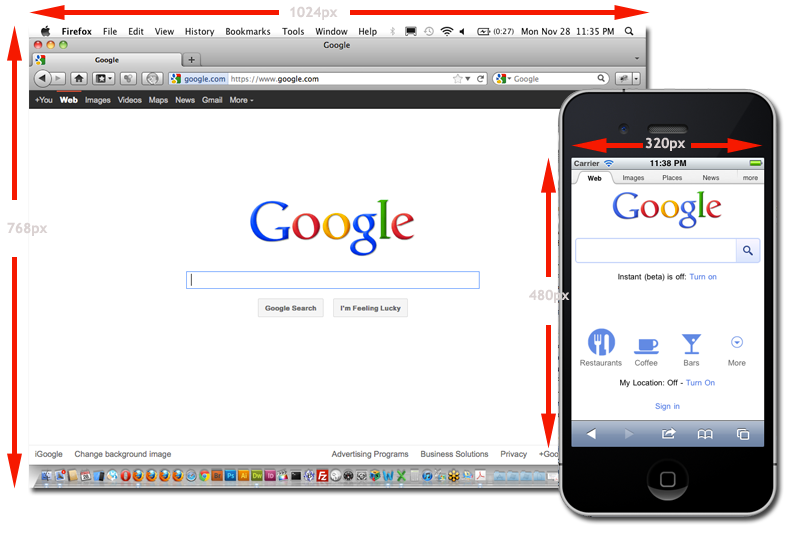
In terms of dimensions, you have to make sure that they are right - that is to fit into the design and that they are no less or greater than they should be. It would be best to adapt to the device (responsive design) because it is today the standard in displaying images on sites.
3. Compression
Regardless of the size of the photo, the problem may be that affect the speed of page loading. The graphics are easier, the page speed will be higher.
If you do not currently have a program to optimize graphics (such as Adobe Fireworks), we recommend using one of the free online tools like Optimizilla or TinyPNG.


4. Picture Name
The easiest part of the work went through - the graphic elements are there; now real optimization is followed.
When naming, generic names such as "g3567gjlpw01_p0o.jpg" should be avoided, which can be made by scripts or programmers who do not know the basic principles of optimization. Instead, you need to manually write the descriptive name for each graph individually. This, of course, does not involve writing a composition; Five to seven words are enough, depending on which keyword you want to rank. It is also recommended to use a hyphen, or minus (-) instead of space because it is a better practice.
For example how-to-optimize-images-for-web.jpg
Additional advice: If a website in a language that uses an alphabet contains umlauts, accents, or diacritics (such as German schön, Spanish tú, Czech Dvořák, or Serbian with latches), it is also recommended to avoid such letters and to do their translation and adjustment (schoen, tu, Dvorzhak, quartz). Google has a smart algorithm and will know what this word refers to, so there's no reason to worry.
5. Title I Alternative Markings
What Google can see in the pictures are headlines and alternative texts that are not visible from the user's page. If you write them in the right way, Google's robots can read them, followed by a reward from Google: ranking in search. Moreover, since the addition of an alternative text is one of Google's ranking factors, it's best for you to become an everyday practice.
Additional tip: When inserting, it is allowed to use spaces instead of hyphens, as well as accents, wizards, and diacritics.
/Responsive-web-design-56a629af5f9b58b7d0e0392f.jpg)
6. Designation Rules
If there are elements repeated on the site - like a logo or icons - it should be consistent in their appointment. The problem can make the situation disappear in one location because the same name was used elsewhere. Therefore, the recommendation of the image is to be named according to a particular rule, and so they never have the same name.
7. Comment To Image
Another excellent place to use keywords in the context are the comments with the image (usually displayed below it). Unlike title and alternative text, visitors can read comments. It would be best to write this text again and not copy, for example, image title - rather than adjust it to the context and the reader.
8. Link With Picture
On content management platforms such as e.g. WordPress, images can lead to some other page on the site or outside it. It is suggested that large-format images are opened in a new tab. On the other hand, if it links to the image in the text, it is best to write the descriptive link (anchor text) (or link to a keyword) that will be associated with it.
Finally, although images are a great way to optimize the content of a site, it should not be overstated and spamming with keywords. Google has banned such bad practices several years ago, so it is necessary to avoid cheating the algorithm at all costs, as the punishment/penalty will follow. Remember: titles, titles and alternative texts should be beautifully written, the size and weight of the image are normal and customized, so the images from your site will appear in searches.
Share the News