
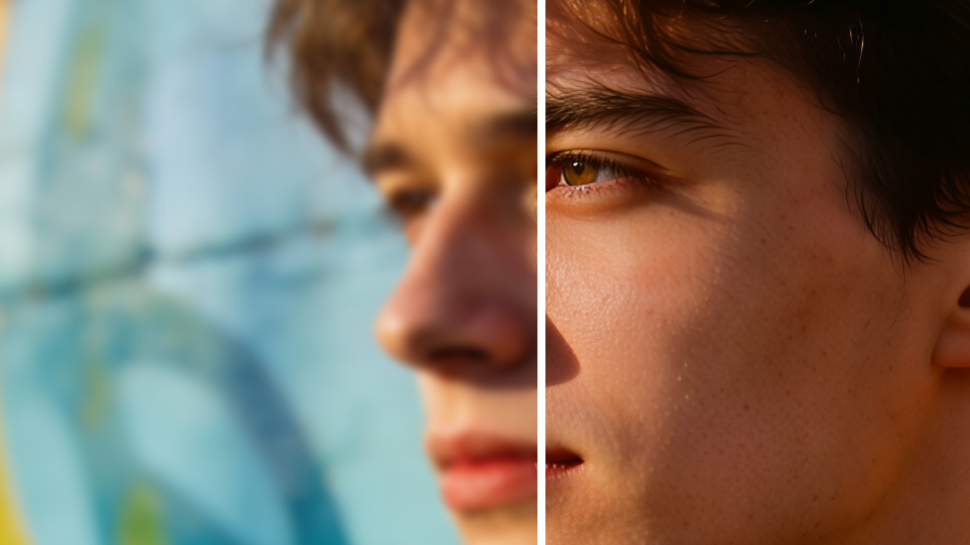

Have you ever found an old photo that looked blurry, pixelated, or too small to use? Whether it's a family picture, a social media graphic, a product image, or a screenshot, low-resolution images can make your content appear unprofessional.
Fortunately, you no longer need expensive photo-editing software or advanced design skills to improve image quality. With an AI image upscaler, you can enhance images online for free and transform low-quality photos into sharper, clearer, and higher-resolution versions within seconds.
What Is an AI Image Upscaler?
An AI image upscaler is an advanced tool that uses Artificial Intelligence (AI) and machine learning algorithms to increase an image's resolution while preserving or improving its quality.
Unlike traditional image resizing methods that simply stretch pixels and make images look blurry, AI upscalers intelligently analyze image patterns, textures, colors, and edges to generate new details and improve clarity.
These tools can:
• Increase image resolution
• Sharpen blurry photos
• Remove pixelation
• Enhance facial details
• Improve textures and colors
• Restore old or damaged images
• Enlarge images without quality loss
Why Use an AI Image Upscaler?
Here are some common situations where AI image enhancement can help:
1. Restore Old Family Photos - Old photographs often lose clarity over time. AI can sharpen facial features and restore details.
2. Improve Social Media Images - High-quality visuals receive better engagement on platforms like Instagram, Facebook, and LinkedIn.
3. Enhance Product Photos - Online stores require clear and professional-looking product images to improve conversions.
4. Upgrade Website Graphics - Blurry website images can negatively affect user experience and brand credibility.
5. Prepare Images for Printing - Low-resolution images often appear distorted when printed. AI upscaling helps maintain quality at larger sizes.
Benefits of Enhancing Images Online for Free
Using a free AI image upscaler offers several advantages:
Fast Processing - Most tools enhance images within seconds.
No Technical Skills Required - Simply upload an image and let AI handle the enhancement.
Cost-Effective - Many platforms offer free image enhancement features.
Better Visual Quality - AI adds missing details while improving sharpness and resolution.
How AI Image Upscaling Works
AI image enhancement tools are trained using millions of high-quality and low-quality image pairs.
When you upload an image, the AI:
1. Analyzes the existing image quality.
2. Detects objects, textures, and edges.
3. Predicts missing visual details.
4. Generates new pixels intelligently.
5. Produces a higher-resolution version with improved clarity.
This process helps create natural-looking enhancements rather than simply enlarging the image.
Tips for Better Image Enhancement Results
Start with the Highest Available Quality - AI works best when the original image contains some visible details.
Avoid Over-Upscaling - Increasing image size excessively can sometimes create unnatural results.
Use Noise Reduction Features - Many AI tools include automatic noise removal for cleaner images.
Choose the Correct Enhancement Mode - Some AI tools provide separate modes for: Faces, Artwork, Landscapes, Documents
Conclusion
An AI image upscaler makes it easier than ever to enhance images online for free. Whether you're restoring old memories, improving website graphics, creating marketing materials, or preparing images for printing, AI-powered tools can dramatically improve image quality with just a few clicks.
Instead of struggling with blurry or pixelated photos, use an AI image upscaler to increase resolution, sharpen details, and create professional-looking visuals without requiring advanced editing skills or expensive software.
By choosing the right AI image enhancement tool and following best practices, you can transform low-quality images into stunning, high-resolution photos in minutes.
Share the News